I use an AI agent for programming every day, and the hardest part hasn’t been choosing a model but deciding what I let it do on its own and what I don’t. After a few months, my conclusion is that the value isn’t only in the choice of model but also in the rules and the review cycle you build around it.
This article describes how I have it set up on this very website, including the failures and the friction. It isn’t a universal guide: it’s what works for me as a solo remote developer on large and small projects, with a lot of care not to lose control of my own code, in the sense of knowing what is being done and what isn’t.
One important detail to set the scene: I always work in the terminal, with both Claude Code and Codex. Everything I describe here, including passing reviews from one to the other, happens in sessions open in the terminal, spread across several tabs.
The starting problem
An AI agent is fast and willing to keep going. That’s the good part, and also the risk: if you ask it to “finish this”, it may take that to include committing, deploying, reorganizing files or touching configuration you never mentioned. When something goes wrong, it doesn’t go wrong slowly.
So before thinking about productivity I asked myself a more boring question: what do I never want it to do on its own, without me asking?
CLAUDE.md as a contract
The answer lives in a file inside the repository, CLAUDE.md, which the agent reads when it starts. I treat it as a working contract, not as documentation. It covers things like:
- Instructions and code style. How control blocks are written, how CSS is structured, the language of the texts.
- Access limits. The agent may only search and read inside the project directory.
- Credentials. It can’t obtain or use them in any way, neither by reading them from a file nor by reconstructing them with a command. If a task needs them, it asks me for them or asks me to run the query myself.
- Single source of truth. All project information lives in the repository. If it isn’t there, it doesn’t exist.
Living in the repository matters more than it seems. It’s versioned, I can review it like any other change and it doesn’t depend on any tool’s memory.
This is a real excerpt from this site’s CLAUDE.md, shortened and translated from the Spanish original:
## Working rules

- **NEVER** browse, search or read files outside the project root directory […]
- **NEVER** obtain or use credentials (database, APIs, external services) in any way […].
  If a task requires access to the database or another system with credentials, ask the
  user to provide them or to run the query/command themselves.

## Git usage

> ⛔ **FORBIDDEN to make commits without an explicit order from the user.**
>
> Finishing implementing code does not authorize a commit. Always wait for the user to
> say "make a commit" or equivalent […]
Two of the contract’s rules, as written in the repository.
That said, not everything lives in CLAUDE.md. It’s organized into sub-documents (such as the version cycle document, adapted to this web project) that CLAUDE.md itself tells the agent to load at will, only when the task needs them. That keeps the main file short and stops the agent from carrying context that doesn’t apply. I also use skills, however, for specific cases I find it more efficient to customize sub-documents, without worrying about the level of abstraction skills add.
One step, one approval
The version cycle, also documented in the repository, works like this: the agent guides me, but never moves forward on its own. Before each step it explains what it’s about to do and waits for my go-ahead. Approval of one step doesn’t carry over to the next.
The sequence is always the same: spec, version branch, version bump, development and testing, closing with the changelog, deployment and merge to main with its tag. For this very article I’ve already gone through it up to the branch: first the spec, then the 0.3.0-blog-ciclo-trabajo-ia branch and the version bump, each after my approval.
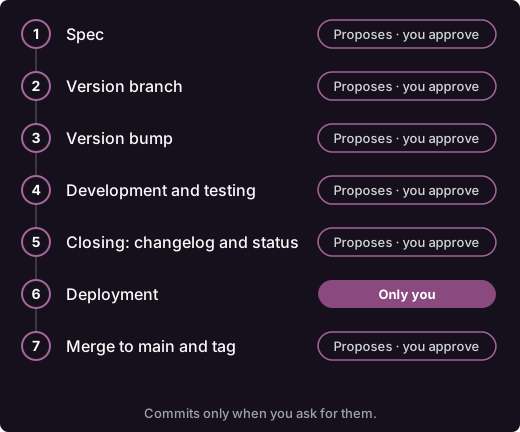
The full cycle. Deployment is the only step I run on my own.
What I appreciate most about this rhythm is that I don’t have to remember the protocol. The agent knows which step we’re on and proposes the next one.
What the agent never does on its own
There are three things I always keep in my own hands:
- Commits. It only makes them when I explicitly ask. Having finished implementing something doesn’t give it permission to commit, and it doesn’t ask me either: I ask when it’s time.
- Deployment. I run it myself with a script. The agent only tells me it’s time to deploy and, if I ask, helps me diagnose the output.
- The merge to
main.mainonly contains what is already deployed, tested and approved. Development and hotfixes live in the version branch.
With this, the worst that can happen in a session is a badly made change in a branch, which gets discarded or fixed, and never reaches production.
Reviewing the diff
The agent being fast doesn’t exempt me from reading what it produces. When I review a change I mainly look at:
- Whether it has gone beyond the scope I asked for.
- Whether it has added more abstraction than needed for what was requested.
- Whether the tests actually test anything or just exist to look good.
It’s a normal diff read, but without the confidence that comes from having written the code myself. That’s exactly where control matters most.
A second opinion from another model
A piece I added later is asking another model for a review. A model reviewing its own work tends to accept the same assumptions it wrote it with, and a different one sees things the first one doesn’t.
At first I used the Codex plugin for Claude Code, which lets you launch the review from the session itself with commands like /codex:review or /codex:adversarial-review. The latter is a read-only review designed to challenge the design decisions and assumptions of a change, not just look for bugs, and it accepts a focus text (for example, race conditions or retries). It authenticates with a ChatGPT account or an OpenAI API key, and can run in the background.
It works and it’s convenient, but it fell short for me for two reasons. First: I couldn’t hold a conversation with Codex the way I can in its own tool; the plugin launches the review and returns the result, and to debate a finding I had to leave it. Second: choosing the model wasn’t as direct as in Codex (according to the documentation, the --model and --effort flags are meant for /codex:rescue, and for reviews you usually edit the configuration). On top of that, these commands are read-only and return the output verbatim, so the review shows up directly in the agent’s session, and I preferred to read it before it did.
Now I do it by hand: I hand the change to Codex, I read its review myself, filter it, and only then pass the main agent what’s worth it, or the other way round, from one to the other. I lose some convenience, but I gain three things:
- I work with Codex in its own tool, where I can talk to it and pick the model without detours.
- I read the review before it reaches the agent, before it’s already part of its context.
- I can discuss or discard findings. An adversarial review pushes hard by design: many findings are valid, but some are irrelevant, extreme edge cases or scenarios that are very unlikely to happen under the project’s real conditions. Filtering that is part of my job, and I don’t want the agent treating everything as equally serious.
There’s also a deeper reason for the pairing. A model that didn’t write the code looks at it without the assumptions of its development, and a stale context can take things for granted that aren’t right. But context helps too: the agent that wrote the change and reads the review, without having done it, immediately sees where each finding fits. That’s why I split the roles: one reviews, the other fixes. In my experience, that combination resolves findings much better than either model alone.
That said, findings and proposals don’t travel through continuous copy/paste from one terminal to the other. I usually create a review document and the work happens on it, and that document is also under version control, so I can see all the progress and the discussions.
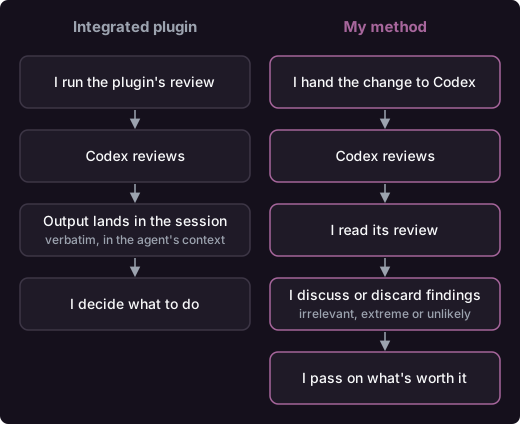
Review with the integrated plugin versus my manual method.
What doesn’t work as well
- It’s slower at first. Asking for approval at each step adds friction, especially on small changes.
- The rules need maintenance. A
CLAUDE.mdthat falls out of date loses its value. It’s one more file in the project and needs care. - Cross-review costs time. It isn’t worth it for every change, and with an unresolved disagreement you still have to decide by hand.
- It still doesn’t replace your own judgment. Neither the rules nor the second opinion change the fact that responsibility for the result is mine.
Existing solutions (and why I still do it by hand)
Cross-review between models isn’t a new problem and there are already solutions that automate it. There are multi-model review skills and plugins, such as Star Chamber, from Mozilla.ai, or revmux, that run several models in parallel and consolidate a report, grouping and verifying the findings.
I’ve considered building my own skill with three actors, an arbiter in between and a review of my own as a last resort when there was no decision. But it has a drawback: I’d lose direct tracking of what is being done. A report isn’t the same as confronting each problem and deciding on it, and for now, with responsibility for the code I deliver to clients, I think doing it by hand is the best way.
What I take away
For me, four ideas matter: a contract inside the repository, a cycle with approval at every step, clear limits on what the agent never does on its own and an external review that I read myself. The specific model is almost beside the point, because it can be swapped; the rules are what make the work predictable.
A final reflection: this way of working can only be understood given the current level of intelligence of today’s models. Most likely, the models to come will already include these review processes out of the box, making many manual reviews unnecessary and limiting decision-making to purely business matters.
If you’re thinking about bringing an AI agent into your workflow, my advice is to start by writing down what you don’t want it to be able to do. And if you’d like to talk about it, get in touch: I’d like to know how you have yours set up.